
Skip to content
ES EN 中文
Book a demo

All your clients' orders in one inbox, and the right channel for each one

Operators that run other companies' operations: first mile, last mile and order preparation, with or without a warehouse of their own.

In a warehouse that prepares orders for several clients, a logistics operator's operations manager scans a parcel label; behind him, service providers in Druppify polo shirts, fleece and blouses pack and move orders.
Line
Druppify 3PL
For
Multi-client logistics operator
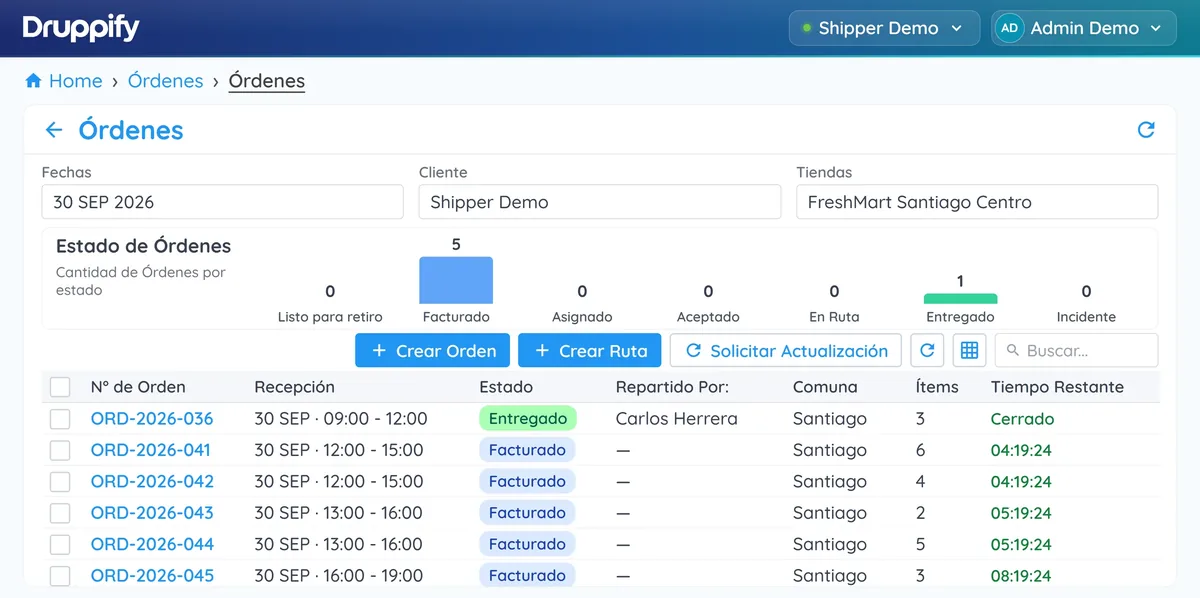
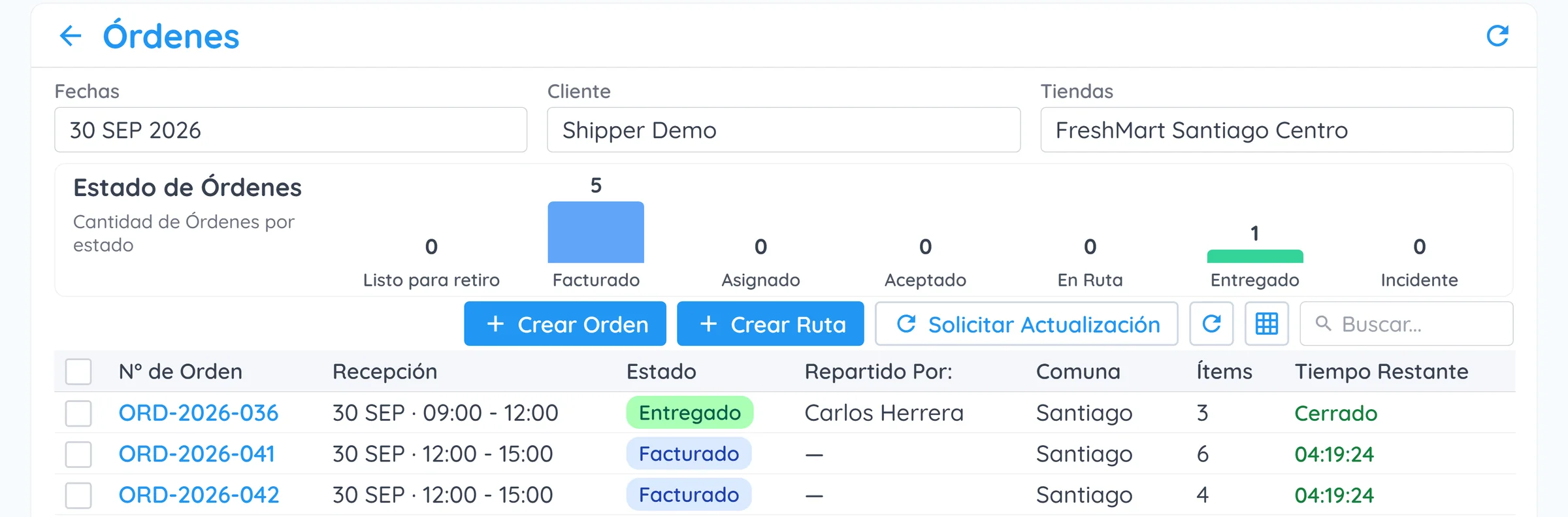
Orders view with a chart of the status of the day's orders and a table with order number, delivery window, status, courier, district, items and time remaining.
Orders · today's ordersProduct screenshot · demo data
Where it starts

Every client comes to me through a different channel, and I put the dispatch together by hand.

How it's done today

Manual downloads from each channel every morning, a master spreadsheet, stock in Excel per client, and WhatsApp with couriers and courier companies.
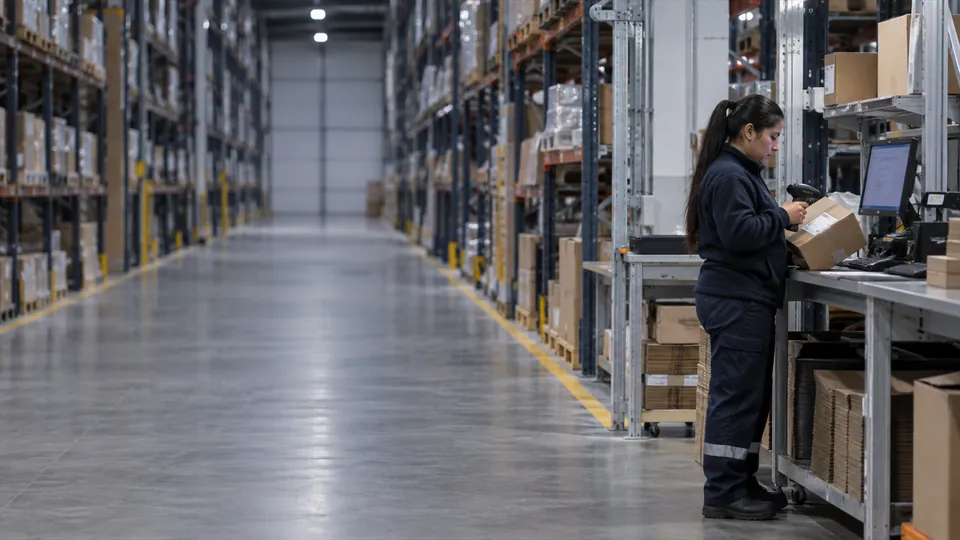
At the end of a long shelving aisle in a dispatch warehouse, an operative scans a parcel next to the warehouse terminal, among boxes ready to ship.
Multi-client logistics operator
Cost

What it costs you today

The order that goes out late

The complaint reaches the sales channel, not your warehouse. And the one who looks bad in front of the buyer is your client.

The client who walks away

For lack of visibility. A 3PL client is worth months of revenue: it's the cost that weighs the most.

The whole morning

Downloading orders by hand, channel by channel, before anyone starts preparing.

3PL

How many orders do you download by hand every morning, and who does it? That time has a cost, and today it doesn't appear on any line item.

Why

Excel holds up until the client who comes in through a channel you didn't have.

The problem isn't volume. It's that every new client brings its own channel, its own format and its own demand for visibility, and all of that ends up in the same spreadsheet.

How it's done today and how it's done with Druppify
Today With Druppify
Manual download, channel by channel Integration accounts per client
One master spreadsheet per operation Single multi-client inbox
Client stock in Excel Stock balance per client, with evidence
Dispatch channel decided from memory Channel decision recorded
  1. Connect

    One integration account per client. Mercado Libre first, then Shopify, VTEX and API. Also file upload, for anyone without a digital channel.

  2. Organise and store

    A single inbox with channel, client, warehouse, deadline and parcels. And stock per client inside your warehouse, with receiving, balance, counts and adjustments.

  3. Prepare

    Picking that deducts from the balance, packing and labelling, with evidence of who did what.

  4. Dispatch through the right channel

    Your own fleet with routes, a contracted carrier, a connected courier service or an open tender. The decision is recorded.

  5. Return visibility and bill

    Tracking and proof of delivery back to the source channel, a portal with your branding, and billable usage per client.

  6. Mixed wave

    The robot does the moving and the person does the picking. It's planned together and settled separately. That's Druppify Sense.

    Druppify Sense
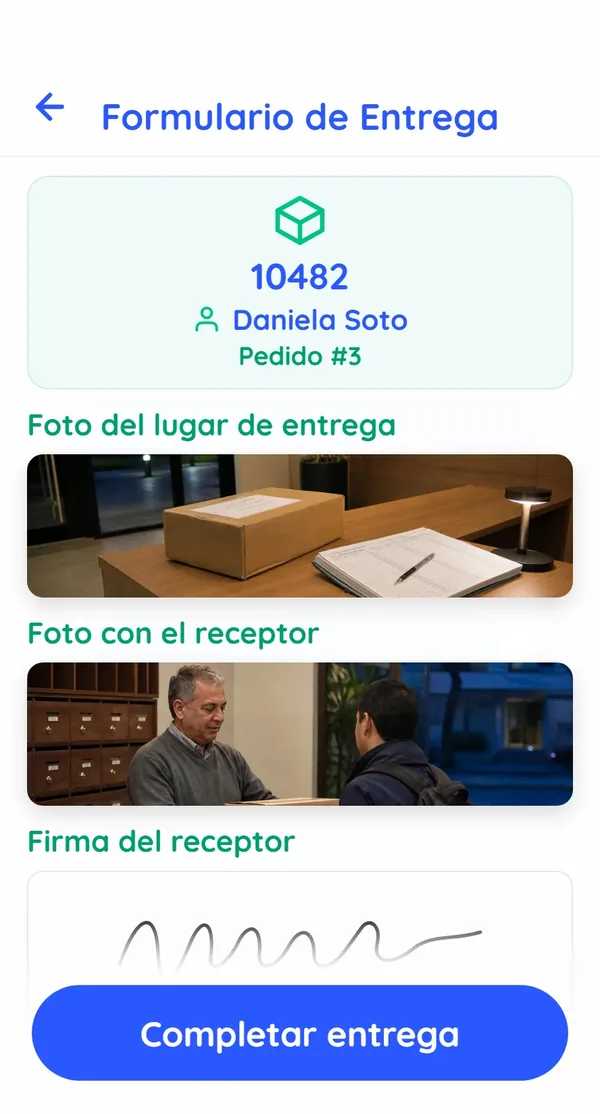
Service provider app: an order's Delivery Form with the photo of the delivery location, the photo with the recipient, the recipient's signature and the Complete delivery button.
App · delivery formProduct screenshot · demo data
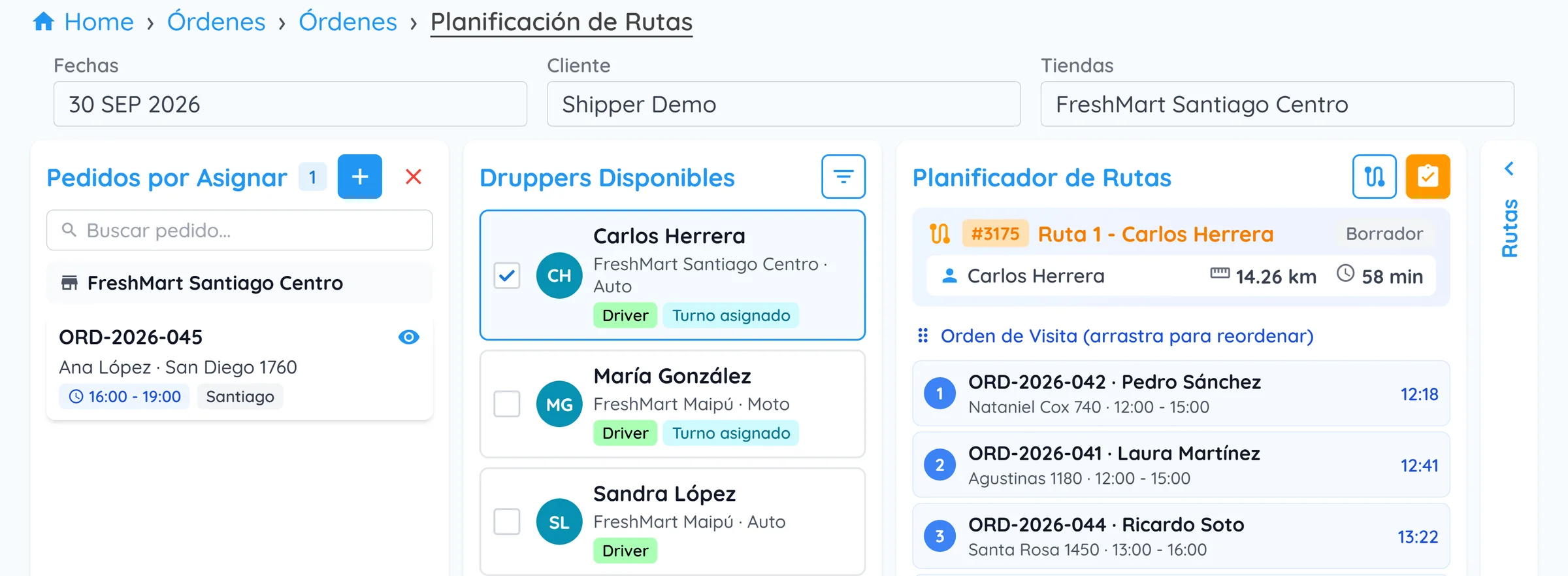
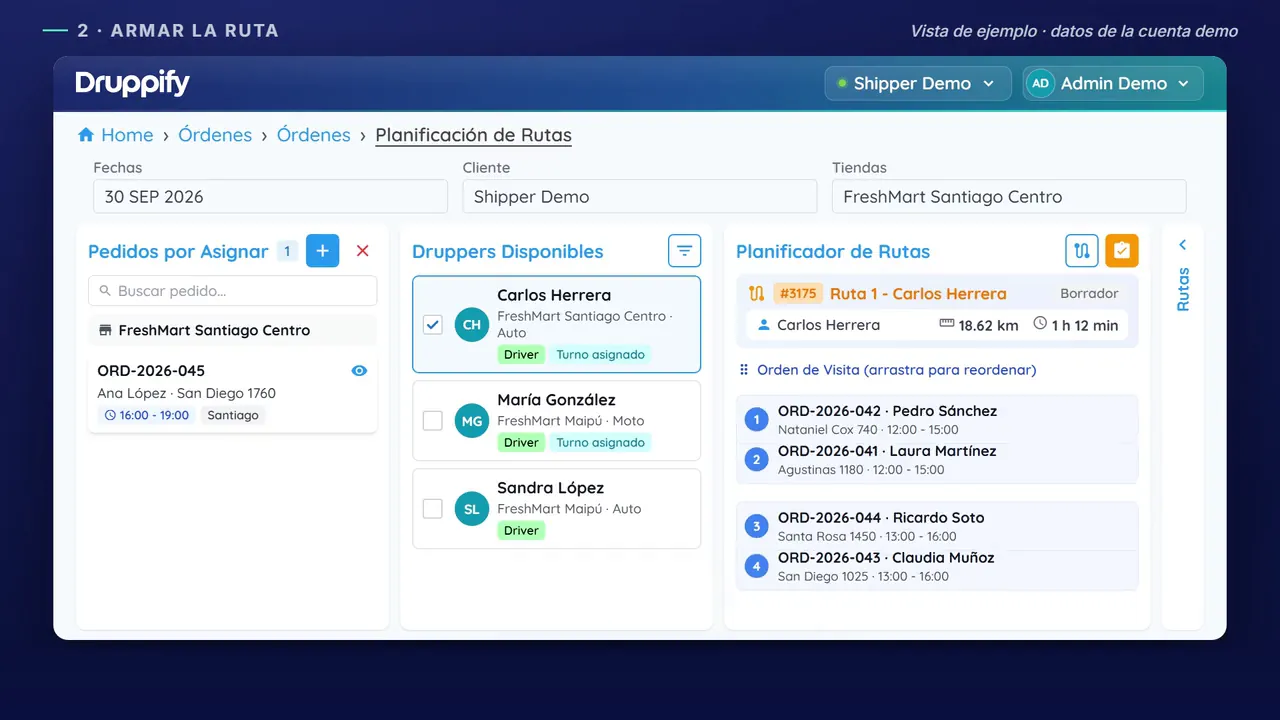
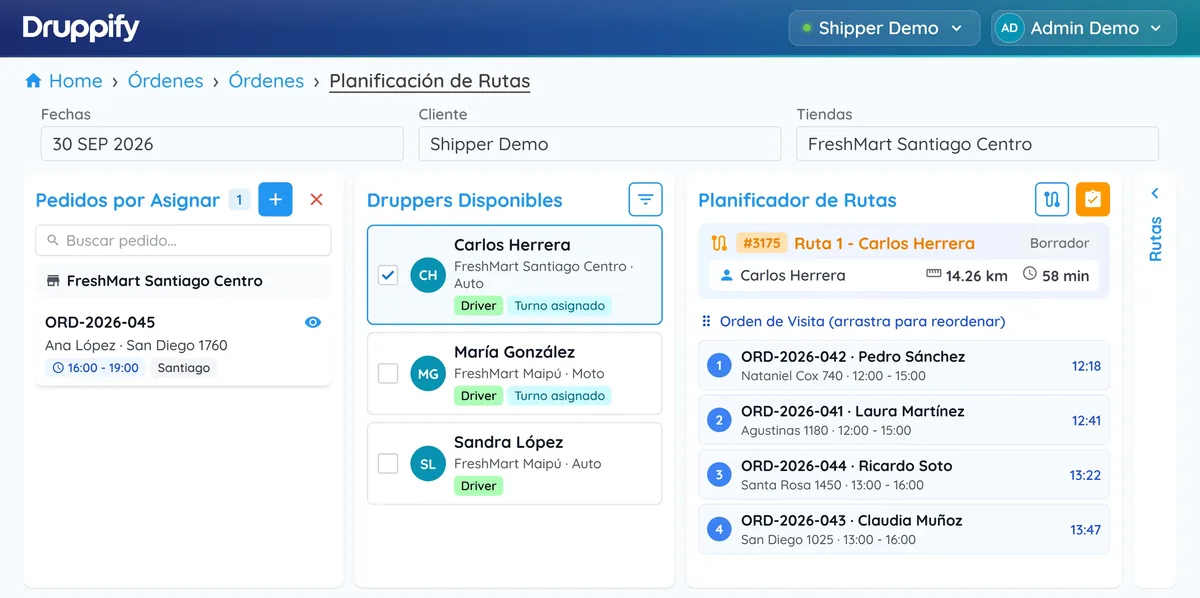
Route Planning: orders to assign, available druppers with an assigned shift and the planner with a four-stop route in visiting order, with its distance and estimated time.Route Planning: orders to assign, available druppers with an assigned shift and the planner with a four-stop route in visiting order, with its distance and estimated time.
Routes · the day's planningProduct screenshot · demo data
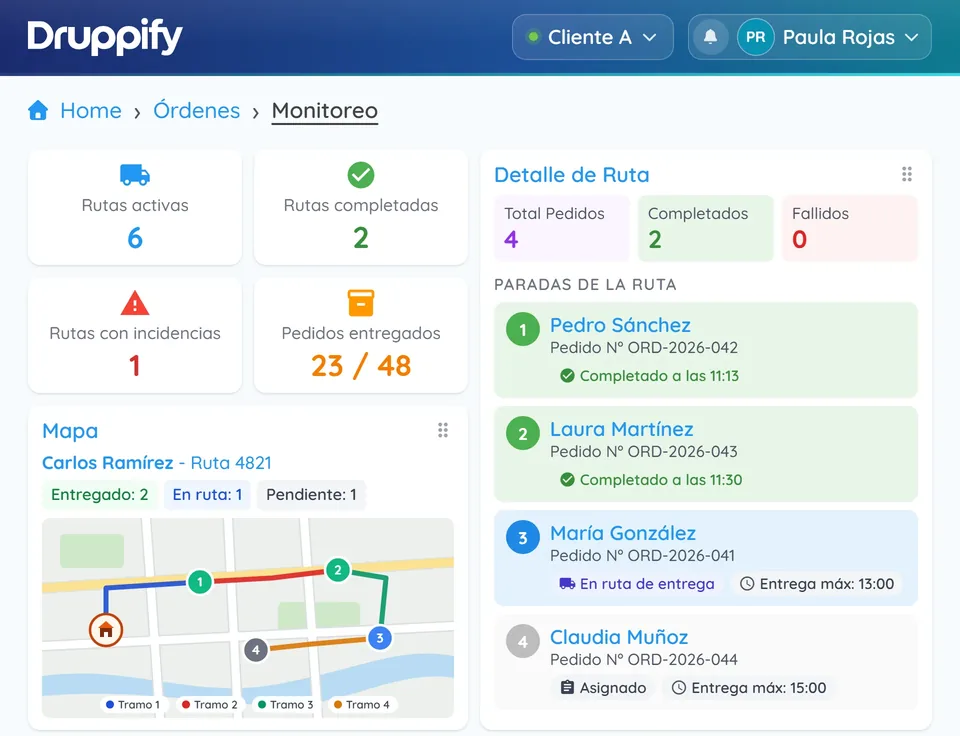
Order Monitoring with indicators for active routes, completed routes and routes with incidents, delivered orders, the route drawn on the map by leg and the details of each stop with its status. Order Monitoring with indicators for active routes, completed routes and routes with incidents, delivered orders, the route drawn on the map by leg and the details of each stop with its status.
Monitoring · the route on the mapProduct screenshot · demo data
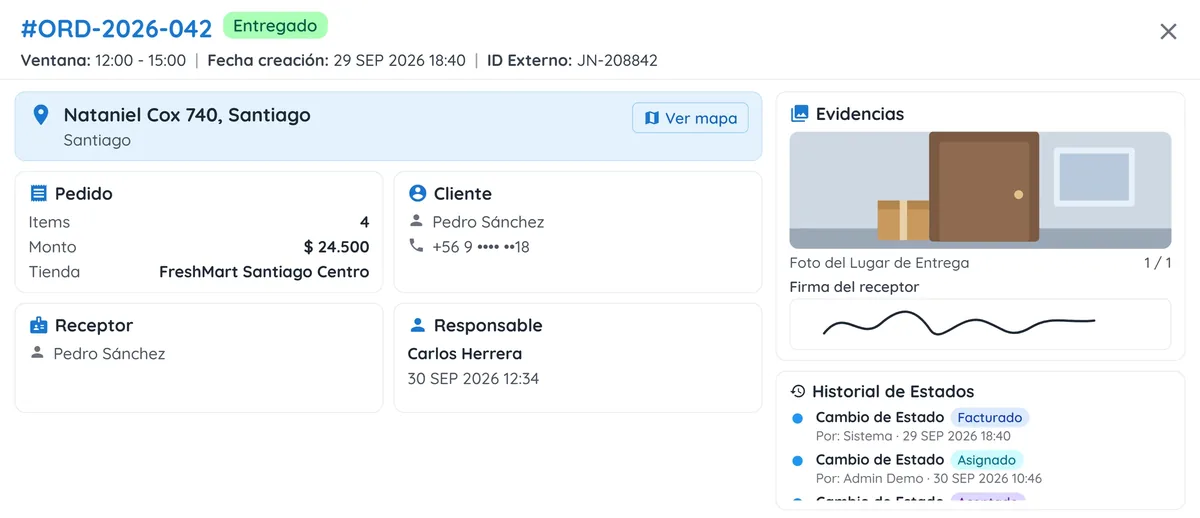
Details of a delivered order: address, order, customer, recipient and person responsible, the photo of the delivery location, the recipient's signature and the status history showing who made each change. Details of a delivered order: address, order, customer, recipient and person responsible, the photo of the delivery location, the recipient's signature and the status history showing who made each change.
Orders · delivery evidenceProduct screenshot · demo data
Orders view with a chart of the status of the day's orders and a table with order number, delivery window, status, courier, district, items and time remaining.Orders view with a chart of the status of the day's orders and a table with order number, delivery window, status, courier, district, items and time remaining.
Orders · today's ordersProduct screenshot · demo data
Sample product view
The proof

What we can show you in the first meeting

Live

We connect a Mercado Libre account during the meeting and you watch your orders come in.

Picking and routes

Picking with units per order and last-mile routes, on the same platform as your orders.

Back to the channel

Tracking and proof of delivery go back to the channel where the order originated.

Pricing

How we charge

Unit of value

The processed order

A monthly base plan, plus per-order usage above the included allowance, plus a module for each activated connector.

Why we charge this way

It's the unit you already use to invoice your clients, so the cost can be passed on. And whoever has five channels pays more than whoever has one, which is fair.

What it's compared against

An order that goes out late, and a client lost for lack of visibility.

We never compare against other software. The price is compared against the cost of the error it prevents.

Rollout

How we start

Scope
One of your clients, with its channel connected.
Timeframe
Two weeks.
Success criterion
No one downloads orders by hand during the rollout.

The sign that it worked is simple: they ask us to connect the second client without us suggesting it.

Frequently asked questions

No. If you already have one up and running, we connect to it. Druppify doesn't handle batches, serial numbers, expiry dates or slotting.

No. You contract the transport yourself.

The ones the client already uses: marketplaces, their own stores and API. Each connector is a module.

The next step

Forty-five minutes, with your operation on the table

We connect your real account during the meeting and you watch the orders appear. No argument can match that.

Book a demo

What we'll ask you

  1. How many clients do you have, and how many different channels do you handle?
  2. How many clients do you store stock for, and where do you keep track of that balance?
  3. What do you show your client today about the status of their orders?